ToolsCompareBlog Download

Run your own month.

Budget44 is a budget and expense tracker you fill in yourself. Transactions, bills, budgets and saving goals live on your phone, and nowhere else.

Free on iPhone and Android. No account, no ads, no bank login.

Three steps, then it is just upkeep.

Set it up once. After that the app is just a place to log a transaction and watch the month unfold.

  1. Set up your accounts and starting balances.

    Cash, checking, savings, investments, and the credit cards and loans you owe on. Toggle each account in or out of your net-worth total, colour-code them however you like, and archive the ones you have retired.

  2. Add the recurring stuff and cap your categories.

    Salary on the 1st and 15th, rent on the 1st, streaming once a month, on the cadence it actually repeats on. Then set monthly budgets on the categories you care about, one month at a time or as a template that rebuilds itself.

  3. Log a transaction. Watch the month track itself.

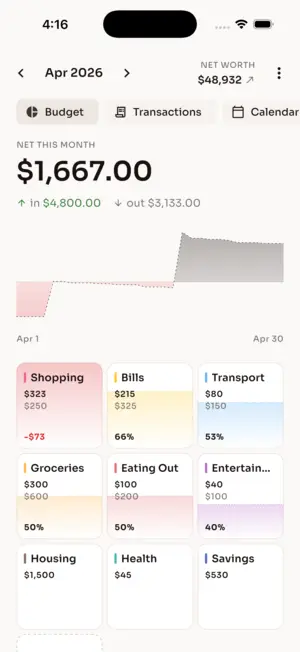
    Tap once, pick a category, save. The home dashboard updates behind you: net this month, the daily-net chart, every budget row. No spreadsheet, no CSV import, no bank login to wire up.

One app for the whole financial month.

Not a transaction list. Not a budgeting widget. The whole loop, from net worth at the top to the next bill at the bottom.

Your whole month, the moment you open it

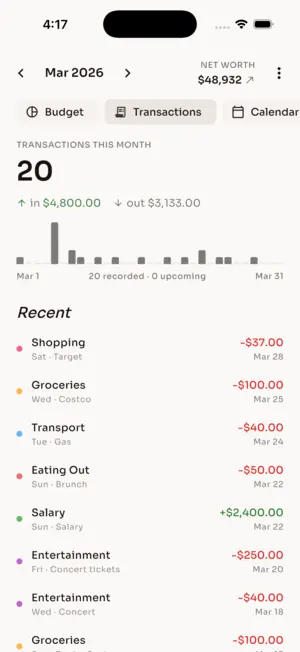
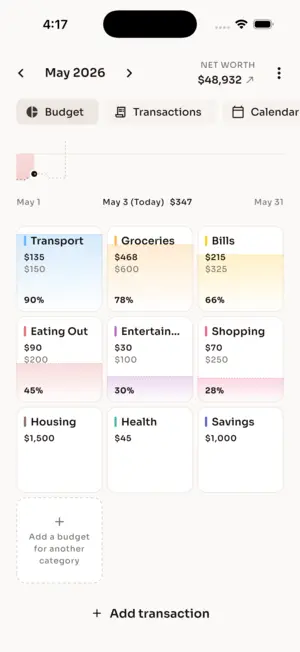
Net this month sits at the top, income in minus expense out, with a daily-net chart of projected against actual. A chip row swaps the screen between Budgets, Transactions, Calendar, Saving Goals and Accounts without ever navigating away.

Accounts, liabilities and net worth

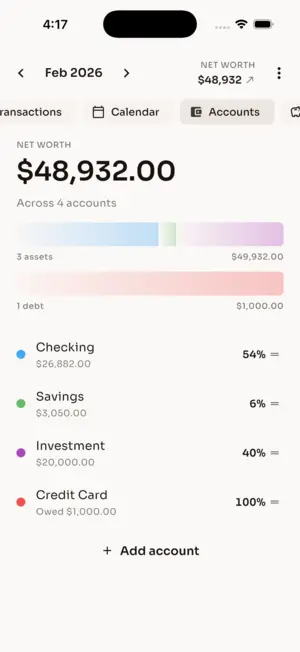
Assets minus liabilities, tracked over time. Composition bars show each account's share of the bucket, a history chart plots net worth month by month, and any account opens into its full ledger.

Budgets that rebuild themselves

Cap a category for a single month, or set a recurring template that creates the budget again every month until you end it. Each row shows percent used and what is left, and taps through to every transaction behind the number.

Recurring bills, projected forward

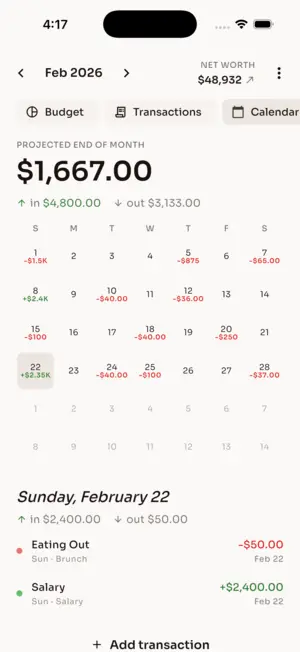
Daily, weekly, biweekly, semimonthly, monthly or yearly, with optional end dates. Future occurrences show up on the home Upcoming list and as projected entries on the calendar, so a rent day never arrives as a surprise.

Saving goals with a real ring

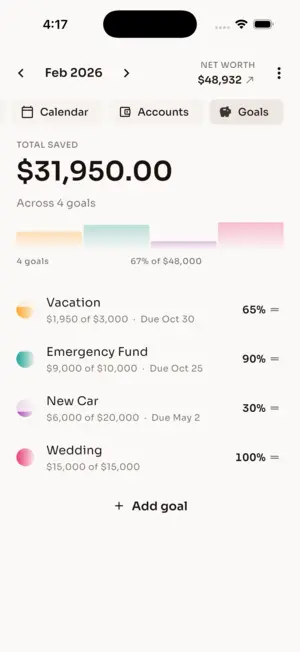
Vacation, car, house, wedding, emergency fund, or anything you name yourself. Deposits and withdrawals post as real transactions, and the ring tracks saved-of-target, percent complete and days left to the deadline.

Private, offline, no account

Every transaction, account and goal lives in a database on your phone and nowhere else. No sign-up, no sync, no ads. 28 hand-built themes and 39 languages, including right-to-left.
The shape of the app.

Dashboard, budgets, transactions, calendar, accounts and goals. The six screens you will spend almost all of your time in.

Budget44 Home dashboard screen
Home dashboard
Budget44 Budget progress screen
Budget progress
Budget44 Transactions screen
Transactions
Budget44 Month calendar screen
Month calendar
Budget44 Accounts screen
Accounts
Budget44 Saving goals screen
Saving goals

Every dollar accounted for. Literally.

Most budgeting apps ask for a bank login first and a decision second. You hand over credentials, wait for a sync, then spend the evening re-categorising a feed of transactions somebody else's parser guessed at. Budget44 starts from the other end: you enter what you spent, and the month is built out of things you actually decided.

The arithmetic underneath is exact. Amounts are stored as whole minor units rather than floating-point numbers, so a total is right to the cent after ten transactions and still right after ten thousand. No rounding drift, no cent that appears out of nowhere when you scroll. The figure at the top of your dashboard is the same figure you would get adding the rows up by hand.

Questions people ask before installing.

Is Budget - Expense Tracker free, and what does Premium add?

The app is free to download and free to use. Logging transactions, one-off budgets, the home dashboard, the calendar, stats and net worth are all included with no cap. Premium is an optional subscription with a 7-day free trial — pricing is shown in your local currency in the app before you confirm — and it lifts the free-tier limits on accounts, saving goals, recurring transactions, recurring budgets and custom categories, and unlocks all 28 themes. If you ever stop subscribing you keep full read and edit access to everything you already created.

Does it connect to my bank?

No, and that is deliberate. There is no bank sync, no bank-linking service and no card connection. You enter transactions yourself, which is why the app needs no credentials from you and no account with us. The trade-off is honest: manual entry takes a tap or two a day, and in exchange nothing about your finances leaves your phone.

Does it work offline, and where is my data stored?

It works entirely offline. Transactions, accounts, categories, budgets, recurring templates and saving goals are stored in a local ObjectBox database on your device — there is no account to create, no cloud backend and no sync. That also means the data is not backed up to us: if you delete the app, the data goes with it.

Which currency does it use?

Whichever currency your device is set to. There is no in-app currency picker — amounts are formatted using your phone's locale and currency conventions, so changing the region in your device settings changes the formatting. The interface itself is translated into 39 languages, including right-to-left layouts for Arabic and Hebrew.

How does it handle recurring income and bills?

You create a template with an amount, a category, a start date and a cadence — daily, weekly, biweekly, semimonthly, monthly or yearly — plus an optional end date. The app projects the future occurrences onto the Upcoming list and the calendar, and the calendar shows recorded transactions and projected ones with different markers so you can tell what has actually happened from what is still coming.

Is it on both iPhone and Android?

Yes. Budget - Expense Tracker runs on iOS 15 and later and on Android, and both versions have the same features. Because the data is local to each device, there is no sync between a phone and a tablet — each install keeps its own ledger.

More from EHM Tech.

Budget44 is part of a small lineup built for everyday earners. All free, no accounts, no ads.

Paycheck Calculator

What actually lands in your account after federal, state and FICA withholding. The number your income budget should be built on.

Salary Calculator

Turn an annual salary into weekly, biweekly and monthly take-home, so a job offer becomes a figure you can plan a month around.

Tax Calculator

Estimate your federal income tax and refund before filing season, and budget for the bill instead of being handed it in April.

Tip Tracker

Log shifts and tips as you earn them. If your income varies night to night, this is where the income side of your budget comes from.

Your money.
Your phone.

Get Budget44 free on iOS and Android. No account, no ads, no bank login. Every figure stays on your device.